The problem
An operations team can receive the same financial event more than once. If invoice creation, payment confirmation, and refund completion each use separate manual steps, it becomes hard to see which record was written, what message was sent, and whether a repeated event created a duplicate action.
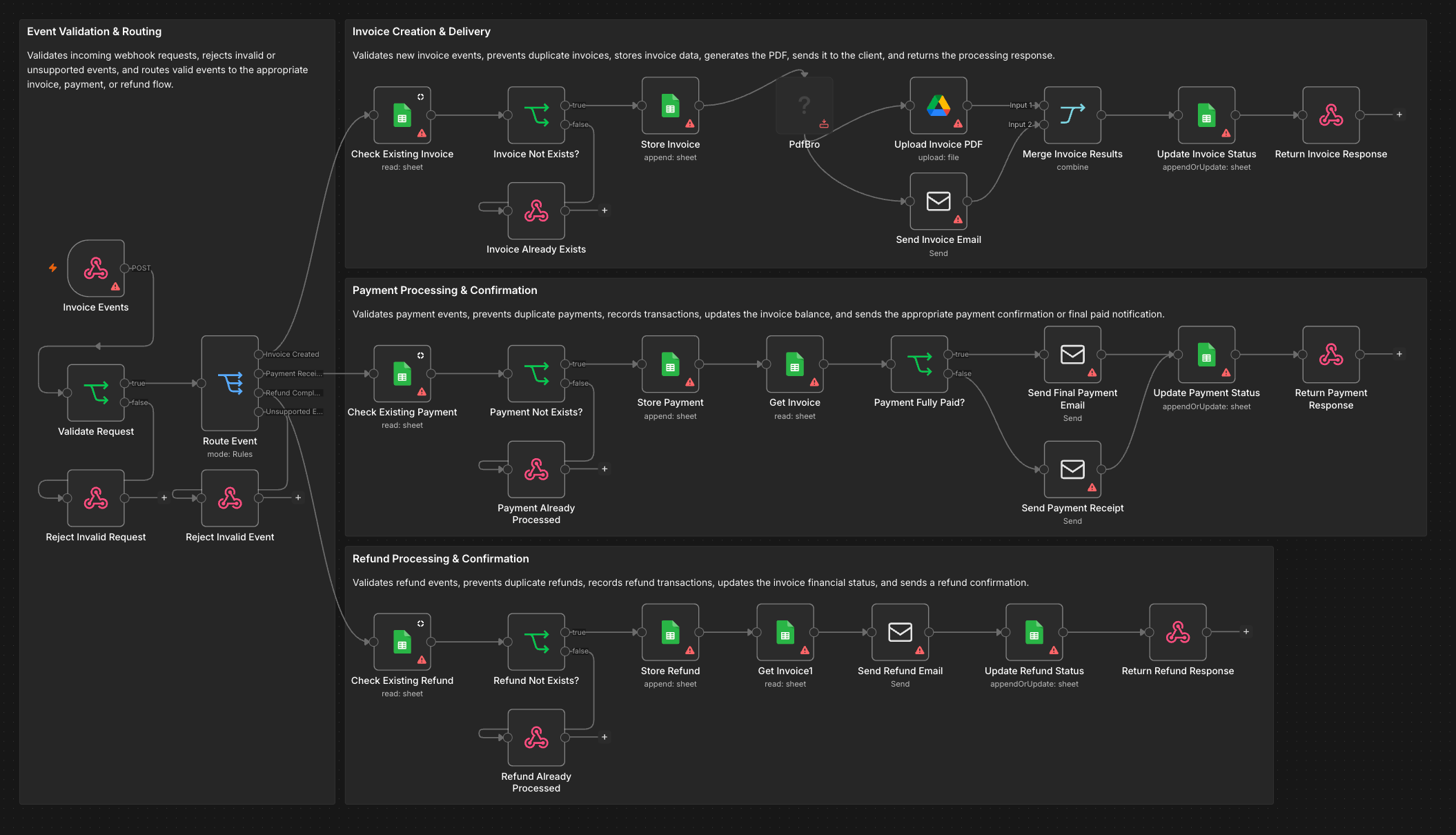
I built Invoices and Payments as a single, readable n8n canvas for those three event types. It is organized into square sections: validation and routing, invoice creation and delivery, payment processing and confirmation, and refund processing and confirmation. The labels name the work each node is meant to do, so the whole route can be reviewed before opening a node.
How the workflow is designed
A webhook receives an event. The first IF node requires an event_id and event_type; a Switch routes invoice.created, payment.received, and refund.completed. Invalid or unsupported events go to response nodes rather than into a financial branch.
Each branch starts with a Google Sheets lookup and a duplicate check. The invoice route records the invoice, generates a PDF with the PdfBro community node, uploads the document to Google Drive, sends an email, merges those actions, updates status, and responds to the webhook. The payment route records the transaction, reads the invoice, branches on whether the amount due is zero, sends the appropriate email, updates status, and responds. The refund route records the refund, reads the invoice, emails the client, updates status, and responds.
The duplicate checks are visible design intent in this imported build. They still need execution tests against a real sheet schema and repeated webhook deliveries before I would call them reliable idempotency controls.
What is verified locally
I inspected the workflow in the local n8n editor and checked the saved graph: one webhook enters validation; the Switch connects to the three named branches; each branch has a response path. The saved workflow has 33 executable nodes and four section notes. It is inactive and has no recorded executions in this local instance.
The screenshot is an actual editor capture. Warning icons show setup that remains: Google credentials, email transport, Drive configuration, and the PdfBro community node need to be ready before an end-to-end run. This page does not claim that an invoice was delivered, a payment settled, a refund issued, or any time saved.
What production readiness would require
I would test a new event, a duplicate delivery, a malformed payload, an unknown event type, a partially paid invoice, and an already-refunded payment with synthetic records in a sandbox. I would also check webhook authentication, the sheet's unique IDs and update semantics, PDF output, email delivery, Drive permissions, and failure behavior when one of the parallel invoice actions fails. Once those paths pass, the workflow can be connected to an agreed financial source of truth and measured against real operational outcomes.