01 · Intake
Turn an enquiry into a case
Validate the intake payload, classify the enquiry with an AI chain, create a case record in Google Sheets, notify the lawyer, and acknowledge the client.
- 01Webhook
- 02Validate
- 03AI classify
- 04Sheets
- 05Notify
Case operations · Local n8n build
An enquiry can arrive by form, phone, WhatsApp, or document upload. This n8n build gives each route a named place in the case lifecycle, with a lawyer approval step before contract feedback reaches a client.
Inside the automation · Eight webhook routes · one schedule · one error trigger
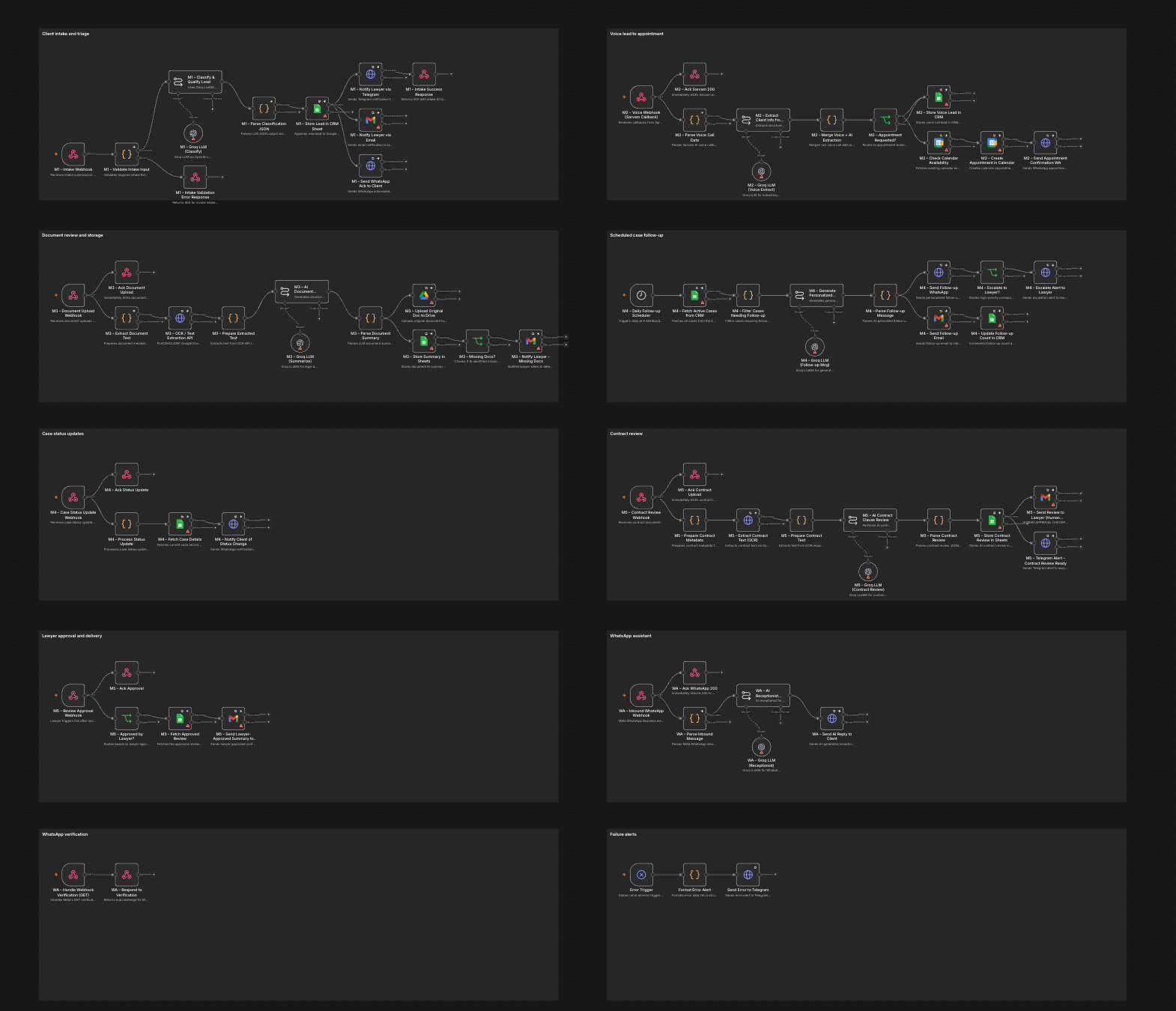
The polished canvas keeps one copy of each unique route and separates the work into ten sections. These stages show the intended handoffs; the imported build has not been run against live services.
01 · Intake
Validate the intake payload, classify the enquiry with an AI chain, create a case record in Google Sheets, notify the lawyer, and acknowledge the client.
02 · Voice
Parse a Sarvam voice callback, extract the request, branch on appointment intent, create a Calendar event, and send a WhatsApp confirmation.
03 · Documents
The document route extracts text, prepares an AI summary, stores files in Drive, and updates the case. Contract review adds a lawyer approval path before a client response.
04 · Continuity
A daily scheduler reads active cases and prepares follow-ups; separate status and WhatsApp routes handle updates and inbound questions. A failure-alert branch is present for review.
A legal intake team can receive the same case through a form, voice call, document upload, or WhatsApp message. Someone then has to classify the enquiry, record the case, arrange an appointment, chase missing documents, and keep both the client and lawyer informed. When those steps sit in separate inboxes, a handoff can be missed without anyone noticing.
I built Client Intake and Case Management in n8n to map those handoffs. Its saved source canvas contained two copies of most routes. I prepared a separate, inactive 77-node copy that keeps one route for each event and organizes the graph into ten section notes. The source workflow remains untouched in local n8n.
An intake webhook validates a new enquiry, sends it through an AI classification chain, writes a case record to Google Sheets, and prepares lawyer and client notifications. A voice callback route extracts call details and can move an appointment request into Google Calendar. A document route extracts text, summarizes it, stores the original in Google Drive, and flags missing material for a lawyer.
The other routes cover scheduled follow-ups, case-status changes, contract review with a lawyer approval step, inbound WhatsApp messages, and webhook verification. A separate error-trigger branch formats an alert. The cleaned canvas keeps eight unique webhook method-and-path combinations plus one scheduled trigger; the section notes make each route readable from trigger to handoff.
These are connected paths in the saved graph, not proof that external services completed their actions. The saved nodes have no bound n8n credentials, so the integrations still need validation. Many nodes select an error output without connecting that output, and the error-trigger branch is not configured as this workflow's error workflow.
I inspected the local n8n graph and checked the polished copy's structure: 77 executable nodes sit inside ten section notes, no connection points to a removed node, and the eight webhook routes have distinct method-and-path pairs. The copy was imported under a distinct name and remains inactive. Both it and the original workflow have zero recorded executions in this local instance; neither has been run end to end.
The workflow therefore demonstrates the intended orchestration and a reviewable canvas. It does not establish that a case was created, an appointment booked, a document reviewed, or a client notified. There are no measured client outcomes to report.
I would first bind sandbox credentials and confirm each external system's payload shape and permissions. Then I would run synthetic scenarios for a valid enquiry, malformed intake, voice callback, missing document, appointment conflict, overdue follow-up, contract approval and rejection, repeated webhook delivery, and a provider outage. The tests need to verify actual records, messages, calendar events, webhook responses, and retry behavior rather than only a green n8n canvas.
Before activation, I would connect failure outputs to explicit recovery or escalation paths, configure and exercise a separate error workflow, secure the webhooks, and define who can approve AI-generated contract summaries. Only after those checks would I publish the routes and measure whether the workflow reduces missed handoffs or response time.
Next