The problem
D2C support teams answer the same high-volume questions across WhatsApp: Where is my order? Can I return this? Which product fits my needs? What happens to my complaint? The difficult part is not writing a friendly sentence. It is routing the request to the right operating system, using that response as the source of truth, and preserving a visible escalation path when automation should stop.
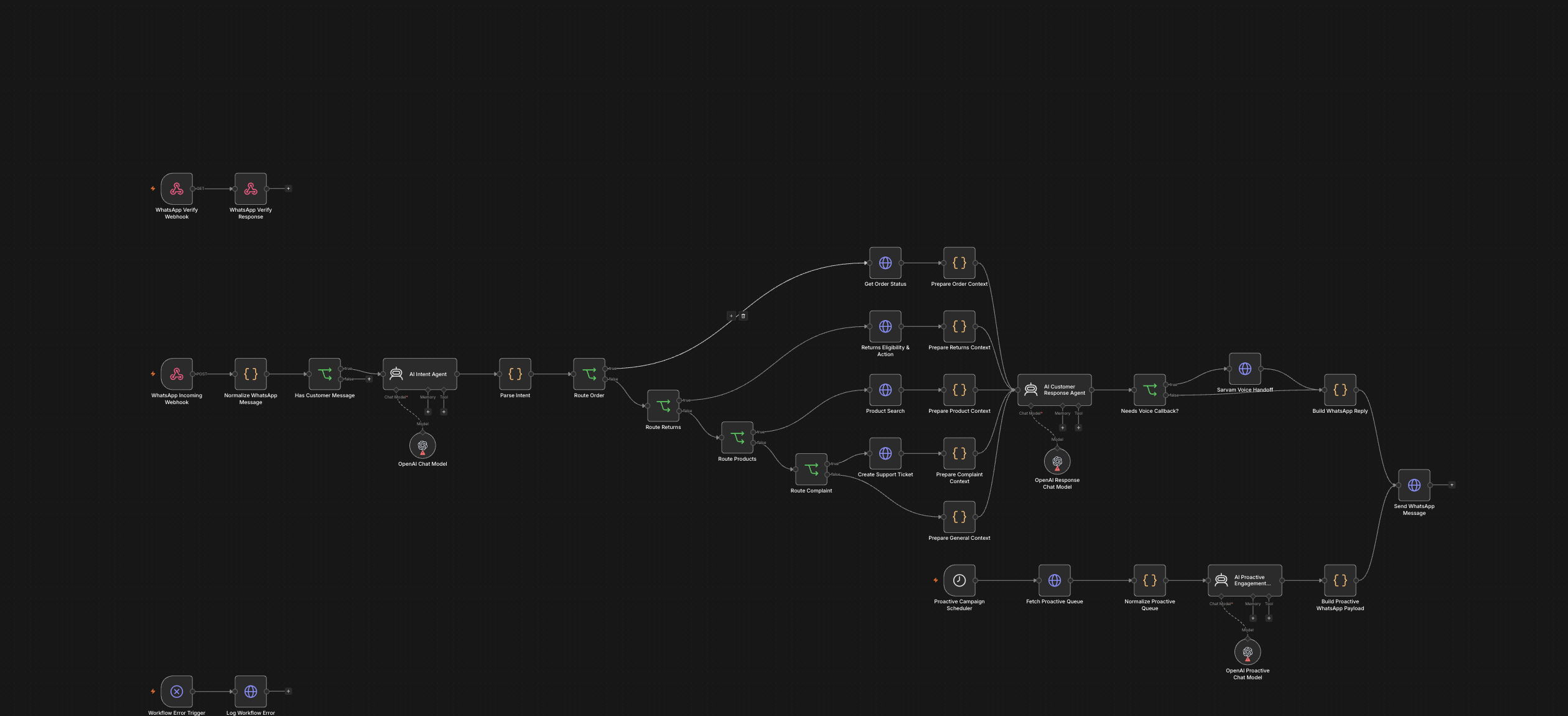
I built D2C WhatsApp AI Customer Support & Sales OS as a local n8n architecture for that handoff. It brings WhatsApp verification, inbound support, five intent routes, commerce and ticketing adapters, an optional voice callback, proactive lifecycle messages, and error logging into one reviewable graph.
How the workflow is designed
A Meta WhatsApp webhook receives the event. A code node extracts the message ID, sender, contact name, message type, and customer text while filtering events that contain no customer message. The first AI agent must return one of five allowed intents in JSON: order tracking, returns or exchanges, product recommendation, complaint, or general support. The parser validates that output and falls back to general support with a human-review flag if the model returns invalid JSON.
Four branches call configurable HTTP adapters for order status, return eligibility, product search, and ticket creation. This keeps the orchestration independent of any one commerce, ERP, or helpdesk vendor. A second AI agent writes the customer reply from the adapter result and is explicitly instructed not to invent order status, refund amounts, dates, products, prices, or policy outcomes. A requested callback can pass to a Sarvam-compatible voice adapter before the response is sent through the WhatsApp Cloud API.
A separate schedule checks a proactive-message queue every 15 minutes. It prepares WhatsApp templates for flows such as COD confirmation, delivery reminders, review requests, replenishment, and cross-sell. An error trigger sends workflow failure details to a configurable logging endpoint.
What is verified locally
I inspected the source JSON, imported a separate inactive portfolio copy, and opened it in n8n 2.38.7. The saved graph contains 35 nodes and 34 connections: two webhook triggers, one schedule trigger, one error trigger, three AI agents, three OpenAI chat-model nodes, ten code nodes, eight HTTP request nodes, and six IF nodes. The canvas shown above is an actual capture of that local workflow.
The build has no embedded credentials and no recorded execution evidence. Its business integrations are environment-based adapter URLs. It does not directly prove a Shopify lookup, a completed voice call, stored call recordings, a support dashboard, reduced response time, or staff savings. Those outcomes require a connected sandbox and observed runs.
What production readiness would require
Before activation, I would connect sandbox credentials and map each adapter to the brand's actual Shopify, OMS, returns, catalog, helpdesk, and voice systems. I would add WhatsApp signature verification, message-ID deduplication, idempotency for ticket and return actions, explicit HTTP timeouts and retry rules, and a real human-escalation queue for needs_human cases.
I would then replay synthetic order, return, recommendation, complaint, callback, proactive-campaign, malformed-model, duplicate-webhook, provider-timeout, and failed-send scenarios. Production reporting should use observed containment rate, first-response time, send success, ticket creation success, escalation rate, adapter latency, and cost per conversation.